
Refresh Your Fall Wardrobe with Stitch Fix By Using “See It On Me” Feature!
This post may contain affiliate links and I may be compensated for this post. Please read our disclosure policy here.
Refresh Your Fall Wardrobe with Stitch Fix By Using “See It On Me” Feature!
Fall is one of my favorite times to refresh my wardrobe, as I get excited to get back into long pants and cozy sweaters. This process just got easier with this cool new tool that lets me see what clothes might look like on me online (versus seeing them only on a model)! It’s called the “See It On Me” feature, and you will find it on Stitch Fix. This made updating my wardrobe for fall both convenient and cost-effective, and I just found it fun to use as well. This is because it helps me to easily find options that work with what is already in my closet, as well as ones I am more likely to keep, as I like the way they look on me (and I am not making decisions based on seeing it on someone else).
Here is how I love to use this tool to update my wardrobe for fall – I had so much more fun shopping with it and seeing how clothes might look on me. I was surprised a few times at how much I liked unexpected outfits when I saw them on myself.

Seeing What the Outfits Might Look Like On You – On Stitch Fix!
This new feature on the Stitch Fix site allows you to upload a picture of yourself and then see what outfits look like on you, and I am loving this shopping experience! It made it so easy to figure out what I wanted to update my wardrobe with this fall, without ever having to leave the house.
It’s not going to be a perfect match, but it is going to give you a general idea of how an outfit might look on you, and I found that more useful than looking at pictures of someone who is not close to my size and shape, etc.
Here is how it works:
Start by uploading a profile picture and then a full-body picture. Once you do that, there are outfit ideas, and you can select “See It On Me” and it will show you a version of the outfit on you based on the images you uploaded.
I will say that the program seemed to get better the more you use it, so give it a try on a handful of outfits. I was surprised by how it impacted how I saw outfits on me. There were some that I liked much more once I saw them on me than I thought I would. Once you try a few outfits on, you will have a “Vision Galley,” and I found this new tool really useful.
Here is how I found it most useful to update my wardrobe for fall, in a way that was most helpful and affordable:
1 – Use the Vision Galley as a way to easily see what you most want to add to your wardrobe this season to refresh it.
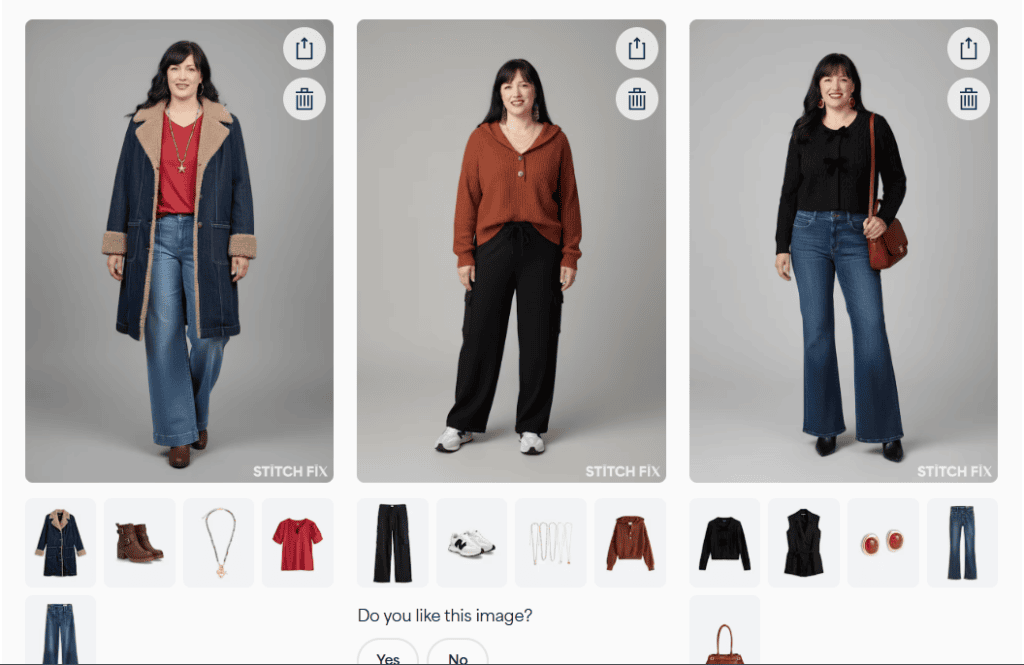
The Vision Galley is a page that you can go to where it saves all of the outfits you have selected to “See It On Me”. The image above is one row of my Vision Galley. I found it really useful to see the outfits all in one spot, so I could see which ones I liked best, or which pieces I liked best. Then all of the items are shown below it, so you can easily find them there. It made shopping for these various looks so convenient!
2 – Use Complete Your Look to find pieces to supplement your fall wardrobe that will go with items you already own!
PLUS – to make it even better, you can try on “Trending For You” looks, which will be items that are all new to you. Or you can select “Complete Your Look,” and it will select outfit ideas based on items you have purchased previously from Stitch Fix. For example, here is an outfit idea it generated for me based on a Stitch Fix jacket I already own (and using the full-body picture that I uploaded). You can see from the various outfits I chose to see on me and have shared here that there will be some kinks, but I found this tool really useful to help me decide what items I wanted to add to my wardrobe to update it for fall.
This made it so convenient for a fall refresh, as I could see outfits made with items I already own, or in some cases, similar to what I owned, so I could easily determine what would add to the wardrobe I already have – just make it better. For example, I have a black sweater and jeans like shown above, but I loved adding the red purse to a basic outfit like that to add a little something extra.
3 – Try on outfits based on current fall styles you love!
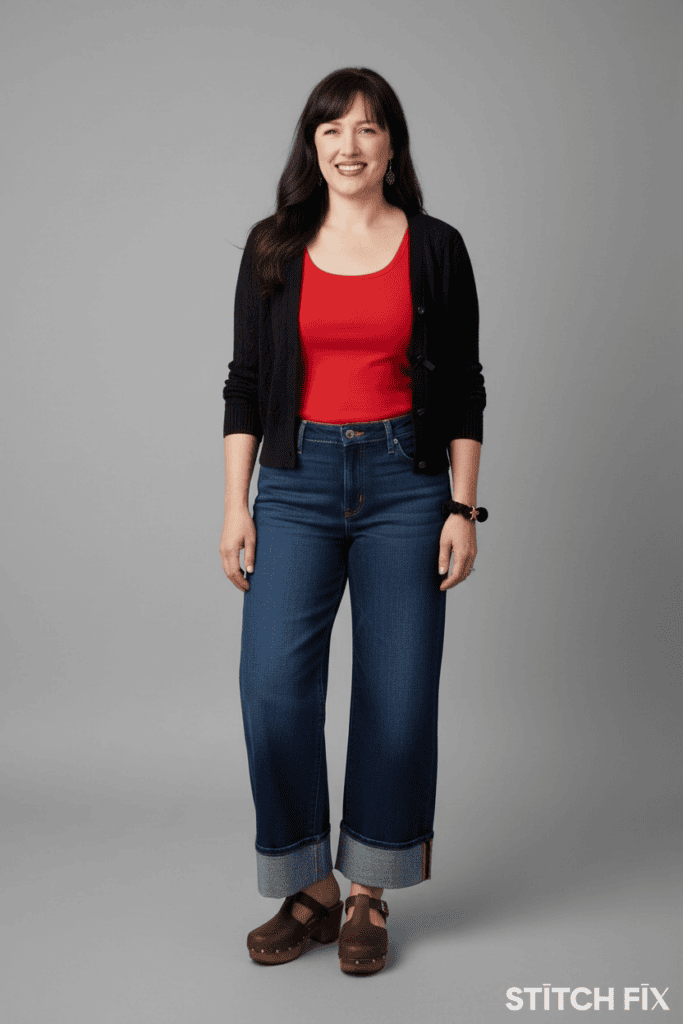
Another way that I like to use this tool to recommend more outfits that feel like me is to search for an item that I love, and then scroll down to the “Ways To Wear It Just For You” section. For example, I love these cuffed jeans, so I searched cuff jeans, and then selected this pair from the results. Once I selected the pair of jeans I loved, it had a handful of outfit ideas in the Ways to Wear It Just For You section, that I could then select to see it on me (like I did with the outfit above).
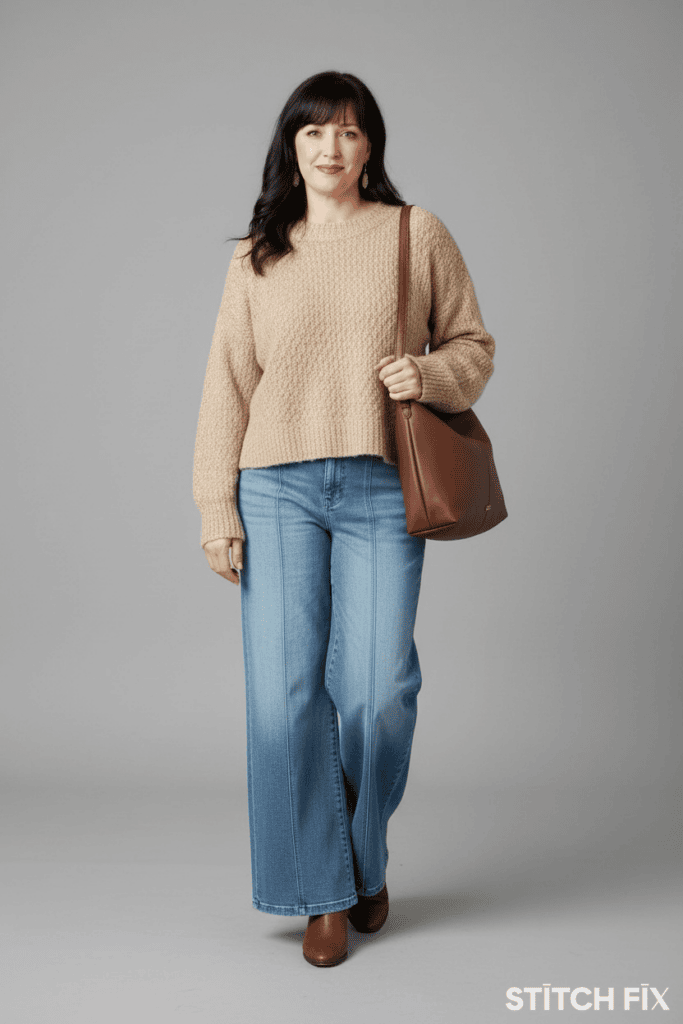
Another example of how I was able to use it to update my wardrobe was that I have these pants and a similar bag, so I was able to find a sweater that I liked with both items that are already in my closet by doing this.
It was so fun to shop these looks and see them with items I already own and what they might look like on me. I created a bunch of looks by using the See It On Me tool, and then went to my gallery to see them all. I deleted the ones I did not love, and then chose the pieces I liked from the ones that were left in my gallery. It was so convenient, and I am a big fan of this new feature. Try it out and let us know what you think!
Fall Trends I am Loving!
Here are some of the fun fall trends to help inspire your shopping on Stitch Fix for the fall season. Try them on yourself to see how you like them!
Tip: Just put these terms into the search bar on Stitch Fix to easily find options currently available.
- Jeans that are cuffed at the bottom. I especially like the dark wash for fall.
- Cardigans that are a bit more fitted this season
- Ballet and Mary Jane style flats
- Shoulder bags (especially in brown)
- Bomber jackets in fun fall colors
- Cable Knit Sweaters
- Wide Leg Jeans and Cargos
More Tips:
- Take a current photo of yourself. It is making me look a decade younger than I do currently, but I think that is my fault as I did not have a recent headshot for the profile picture, so I used an older one. I would recommend taking a current shot to use to make the images even more accurate.
- Select Yes or No about whether you like the picture once it is generated. This seems to help with future images.
- After you have uploaded a headshot, go back and update with a full-body image to get the size and shape of how the clothes might fit you close to real life.
- Create a number of outfits on yourself, then step away and sit on it. Come back after a pause, and they are all in our Vision Gallery to look at with fresh eyes. I find this helps me buy items I really like and am likely to keep for a long time.
NEW! Favorite Daughter Collection:
Stitch Fix has also recently partnered with the Favorite Daughter brand – so there are even more great options to pick from. This line is casual and fun, but provides elevated style options and is designed with busy moms in mind. You can find fun slogans like “The Drop Off Club” on tees, or sweatshirts that say “Favorite Teacher” and more. It makes the transition into back-to-school season and busy schedules easier in terms of throwing on an outfit you will feel great in, so be sure to check it out on the Favorite Daughter brand page here!
How Stitch Fix Works
- Fill out your style quiz at Stitch Fix
- Stylists hand-pick 5 items based on your style, fit, and price range & send them to your home
- Try before you buy, keep what you love & easily send back the rest
- Leave feedback, so your stylist knows what you like and continues to find great pieces for you
- No Subscription Required and lots of ways to shop with them!
- AND Take 30% off Fall Fashion Styles with code FALLFLASH right now!
Plus, we share lots more tips on shopping Stitch Fix here!